Posts

Showing posts with the label General

[HOW TO] Tablet pressure sensitivity in Gimp

Image
To get pressure sensitivity, open the "Configure Input Devices" dialog ( Edit > Input Devices ) and then set the mode for each tablet device (usually there're 3: stylus, eraser and cursor|touch) to Screen . Related Posts Install GIMP 2.8 in Xubuntu 12.04 (ppa) [HOW TO] Xcf thumbnails for Nautilus in Xubuntu 12.04 Enable Single-Window Mode in Gimp 2.8

[FIX] cmake "CMAKE_CXX_COMPILER-NOTFOUND" error

If you come across this error while using cmake to build from source: CMake Error: your CXX compiler: "CMAKE_CXX_COMPILER-NOTFOUND" was not found. Please set CMAKE_CXX_COMPILER to a valid compiler path or name. It means that you don't have the build tools installed (the g++ in this case). Fix Open a terminal window and run: sudo apt-get install build-essential -y References How to fix cmake "CMAKE_CXX_COMPILER-NOTFOUND" error

[HOW TO] Refresh fonts in Gimp without restarting

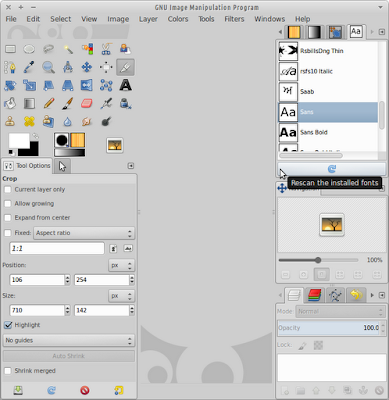
Image
On startup Gimp loads its own fonts (~/.gimp-X.Y/fonts) and system installed fonts. But there's a way of refreshing the font list without having to restart Gimp. First the "Fonts" dialog must be enabled: Windows > Dockable Dialogs > Fonts Then just use the refresh button positioned on the bottom of the "Fonts" dialog: Related Posts Enable Single-Window Mode in Gimp 2.8 Install GIMP 2.8 in Xubuntu 12.04 (ppa) References Fonts Dialog - Gimp Documentation

[HOW TO] Enable Single-Window Mode in Gimp 2.8

Image
In Gimp 2.8 a new Single-Window mode were introduced, however it's not enabled by default. It can be enabled selecting Windows > Single-Window Mode . Gimp 2.8 in Single-Window Mode Related Posts Install GIMP 2.8 in Xubuntu 12.04

Safely remove USB drive from command line

Open a terminal window and run (replace sdc with the appropriate device): udisks --unmount /dev/sdc1 && udisks --detach /dev/sdc Tip You can find the device name using the mount point (replace MOUNT_POINT with the appropriate mount point, eg, /media/disk): grep MOUNT_POINT /etc/mtab References command line alternative for "Safely Remove Drive" at Ubuntu Forums

[HOW TO] Determine and change character file encoding

Determine file encoding: file -bi some_file Change file encoding: iconv -f current_encoding -t destination_encoding file > file_new_encoding List known coded character sets: iconv --list Convert with Vim (eg, converting to utf-8): :write ++enc=utf-8 file_name References Stackoverflow - How can I change a file's encoding with vim? Determine and change file character encoding iconv manpage

No tabs for Thunar

Image
Update: Since version 1.5.1 Thunar supports multiple tabs. Here's how to install it. If you're wondering when will Thunar support tabs, well the answer is never (see the reference bellow ). If you really want/need a file manager with tabs support for your Xubuntu, you could easily install nautilus: $ sudo apt-get install nautilus Nautilus will add tabs support for Xfce/Xubuntu References: When will thunar support tabs? (Xfce Forum)

Xubuntu’s main features

Image
Xubuntu is a Linux distribution. It is derived from Ubuntu and uses the XFCE desktop environment. This means that you get a fully functional operating system, which focus on integration, usability and performance [1] , using less resources than the default Ubuntu choice, Unity. Even though the recommended amount of RAM to run Xubuntu is 512 MB, it runs on a computer has at least 192 MB [2] . Here’s a summary of the available applications on Xubuntu 11.10: Web browser: Mozilla Firefox  E-Mail: Mozilla Thunderbird  Instant messaging: Pidgin  Music player: gmusicbrowser  Movie player: Parole  Graphics editor: GIMP  File manager: Thunar  PDF Reader: Evince  Word processor: Abiword  Spreadsheet: Gnumeric  Text editor: Leafpad  Desktop search: Catfish  As you can see from the above list, Xubuntu provides out of the box full desktop functionality. Go ahead, and give Xubuntu a try (if you haven’t done so)....

Goodbye Ubuntu, Hello Xubuntu

Ubuntu has been my main operating system since Ubuntu 6.10 (Edgy Eft). Throughout this time I tried several Linux distributions: Grml, Chrunchbang, OpenSuse, Arch, etc; but Ubuntu remained as my main preference. I even gave Kubuntu a serious try, but then KDE4 came... and now history repeated itself. I think that neither Unity or GNOME 3 are mature enough to use them on a daily basis. There is a huge the lack of support for customization and, for me, one of the most beautiful things about Linux is that you are able to do things your way; you don’t have to conform to default behavior. With this problem in mind I began to seek for an alternative. But I didn’t wander for long. I read that some people (including some important people like Linux Torvalds [1] [2] ) were switching to XFCE and I knew that Xubuntu had XFCE as its desktop environment, so I'm giving it a try. In the upcoming posts I’ll be documenting my experience with Xubuntu (starting with Xubuntu 11.10). I hope t...