Posts

Showing posts with the label Nautilus

[HOW TO] Install nautilus-gksu (extension for opening files as administrator) in Xubuntu
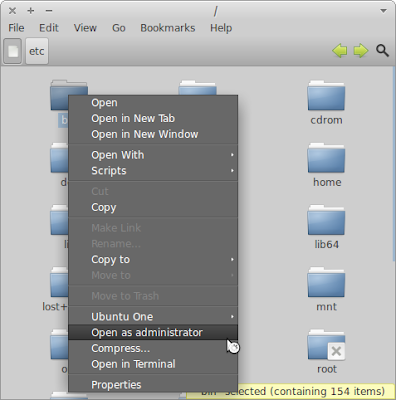
Image
nautilus-gksu is a extension for the Nautilus file manager. It allows to open a file/directory with root/administrator privileges. nautilus-gksu running on Xubuntu 12.04 Install First we need to install the nautilus-gksu package. This package is available on Ubuntu if [[ $(lsb_release -sr) == "12.04" ]]; then echo 'deb http://packages.linuxmint.com/ maya main upstream import' | sudo tee /etc/apt/sources.list.d/linuxmint.list && key=3EE67F3D0FF405B2 && gpg --keyserver subkeys.pgp.net --recv-keys $key && gpg --armor --export $key | sudo apt-key add - && sudo apt-get update; fi && sudo apt-get install nautilus-gksu -y && sudo sed -i 's/Thunar/nautilus/' /etc/xdg/xfce4/helpers.rc
Cover Thumbnailer for Nautilus

Image
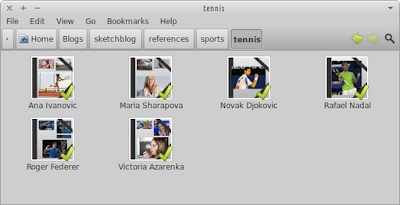
Cover Thumbnailer is a small Python script which displays music album's covers and a preview of pictures which are in a folder in nautilus, the GNOME's file browser. Cover Thumbnailer generate the folder's thumbnail automatically, like any other thumbnailer ; you don't have to generate thumbnails manually. Cover Thumbnailer 0.8.3 works with Nautilus 3.x Cover Thumbnailer 0.8.2 and previous work with Nautilus 2.x Using the PPA bellow, the latest version (0.8.3 at the time of writing) will be installed, which is compatible with nautilus's current version in Xubuntu 11.10/12.04. Cover thumbnailer running on Xubuntu 12.04 Install Open a terminal window and run: sudo add-apt-repository ppa:flozz/flozz -y sudo apt-get update && sudo apt-get install cover-thumbnailer -y Usage Cover thumbnailer should start working automatically after installation (by default it creates thumbnails for the ~/Pictures and ~/Music directories)....

[HOW TO] Openraster (*.ora) thumbnails for Nautilus in Xubuntu 12.04

Image
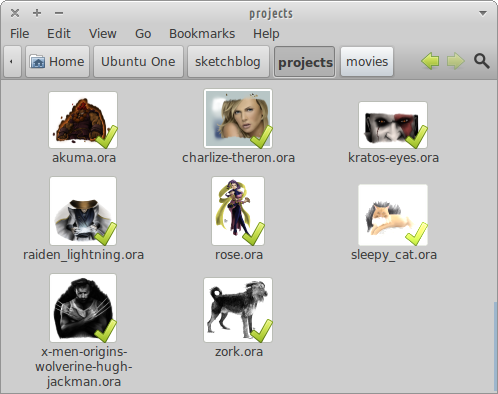
OpenRaster is a file format proposed for the common exchange of layered images between raster graphics editors. It is the default working file format for MyPaint , and it's also supported by application such as GIMP and Krita . Install I created a simple python script (adapting this one , written by David Revoy) that creates the file thumbnail, then all it's needed is the thumbnailer to call the script. Open a terminal window and run: wget -q http://goo.gl/cbXjm -O- | sudo tee /usr/local/bin/openraster_thumbnailer.py wget -q http://goo.gl/nlODH -O- | sudo tee /usr/share/thumbnailers/openraster.thumbnailer sudo chmod +x /usr/local/bin/openraster_thumbnailer.py Related Posts Video Thumbnails for Nautilus in Xubuntu 12.04 Xcf thumbnails for Nautilus in Xubuntu 12.04 References OpenRaster at Wikipedia Krita kra file thumbnailer for Gnome,Nautilus (Linux)

[HOW TO] Xcf thumbnails for Nautilus in Xubuntu 12.04

Image
Xcf is the native file format of the Gimp image editing program. Install To get xcf thumbnails in Nautilus, the gnome-xcf-thumbnailer has to be installed. Then a custom thumbnailer is placed in /usr/share/thumbnailers . Open a terminal window and run: sudo apt-get install gnome-xcf-thumbnailer -y wget -q http://goo.gl/qdhC7 -O- | sudo tee /usr/share/thumbnailers/xcf.thumbnailer Related Posts Install GIMP 2.8 in Xubuntu 12.04 (ppa) Video Thumbnails for Nautilus in Xubuntu 12.04 Openraster (*.ora) thumbnails for Nautilus in Xubuntu 12.04 References Generating Thumbnails for Nautilus using Gimp XCF thumbnailer doesn't work

Video Thumbnails for Nautilus in Xubuntu 12.04

To get video thumbnails for Nautilus just follow the procedure on the "Install" section below. Install Open a terminal window and enter the following two lines: sudo apt-get install ffmpegthumbnailer -y wget -q http://goo.gl/KofKV -O- | sudo tee /usr/share/thumbnailers/video.thumbnailer References Thumbnailing...

[FIX] gnome-open/gvfs-open open nautilus instead of actual file

When using gnome-open/gvfs-open to open a file when nautilus is set as the default file manager, the file is not opened with the preferred application, instead nautilus is opens highlighting the file. After some research I found this to be a bug yet to be fixed. But knowing that exo-open behaves properly, I came out a solution that's a little a hack: replace gnome-open and gvfs-open for exo-open . Fix for YOUR USER only As a prerequisite you should have a "bin" directory on your $HOME and it should be added to your $PATH . Them open a terminal window and run: ln -s `which exo-open` ~/bin/gnome-open && ln -s `which exo-open` ~/bin/gvfs-open Fix for ALL USERS Open a terminal window and run: # backup sudo mv /usr/bin/gnome-open /usr/bin/gnome-open-bak sudo mv /usr/bin/gvfs-open /usr/bin/gvfs-open-bak # create symbolic link to exo-open sudo ln -s /usr/bin/exo-open /usr/bin/gnome-open && sudo ln -s /usr/bin/exo-open /usr/bin/gvfs-open Re...

Set nautilus-open-terminal to open xfce4-terminal

The nautilus-open-terminal is a nautilus extension that allows to open a terminal emulator on the current opened folder. When installed in Xfce the extension opens xterm . To modify it so that it opens xfce4-terminal instead, run the following line in a terminal: $ gsettings set org.gnome.desktop.default-applications.terminal exec /usr/bin/xfce4-terminal References: Setting nautilus-open-terminal to launch Terminator rather than gnome-terminal (Ask Ubuntu)