Posts

[HOW TO] Easily upgrade Xubuntu 12.04 kernel to 3.8

In this article we'll learn an easy way to upgrade the kernel of Xubuntu 12.04 to version 3.8. Upgrade kernel to 3.8 Open a terminal window and run: sudo apt-get install linux-generic-lts-raring -y References What is the best way to upgrade the kernel in 12.04.3?

[SOLVED] adb no such file

Image
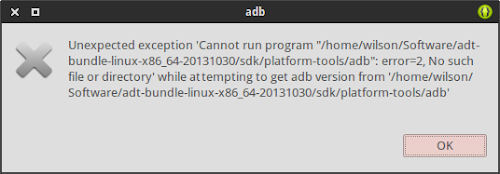
Symptom: When adb is run a "no such file" error occurs: Note: This is also valid for aapt . Fix Open a terminal window and run: sudo apt-get install libc6:i386 libstdc++6:i386 zlib1g:i386 -y References No such file or directory for existing executable

[HOW TO] Install Lastest Blender in Xubuntu

Image
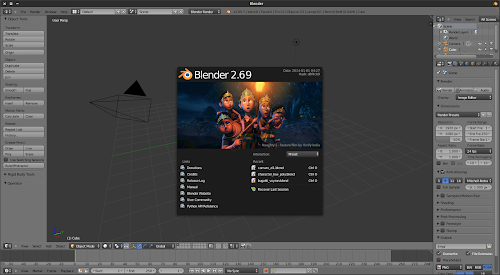
Blender is a free and open source 3D animation suite. It supports the entirety of the 3D pipeline—modeling, rigging, animation, simulation, rendering, compositing and motion tracking, even video editing and game creation. In this article we'll add a PPA so that Blender gets automatically updated to the latest version. Blender 2.69 running on Xubuntu 13.10. Install Open a terminal window and run: sudo add-apt-repository ppa:irie/blender -y && sudo apt-get update && sudo apt-get install blender -y If you are using NVidia graphic card with CUDA you might want to install Blender's CUDA support. This will allow you to render using the GPU instead of the CPU. Run the following command on a terminal window: sudo apt-get install nvidia-cuda-toolkit -y After installing the CUDA toolkit you need to enable it. Open Blender's User Preferences > System and on Compute Device , select CUDA . Enabling CUDA on Blender...
[HOW TO] Install Whisker Menu in Xubuntu

Image
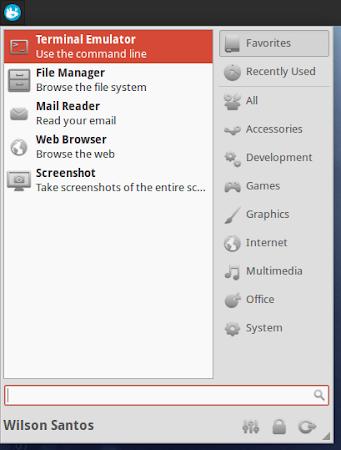
Whisker Menu is an alternative to the Xfce application menu. It comes with a search function, it supports browsing applications by category, you can add applications to favorites and more. Install If you're running Xubuntu 13.10, 13.04, 12.10 or 12.04 with Xfce 4.8, open a terminal window and run: sudo add-apt-repository ppa:gottcode/gcppa -y && sudo apt-get update && sudo apt-get install xfce4-whiskermenu-plugin -y If you're running Xubuntu 12.04 with Xfce 4.10, open a terminal window and run: sudo add-apt-repository ppa:landronimirc/xfce -y && sudo apt-get update && sudo apt-get install xfce4-whiskermenu-plugin -y Usage Add a "Whisker Menu" item to the Xfce panel. See this to learn how to add an item to the panel. Assign keyboard shortcut If you would like to show the menu when pressing a key combination, add a new application shortcut with the command: xfce4-popup-whiskermenu ( Settings Manag...

[SOLVED] gTthumb Could not save the file

Image
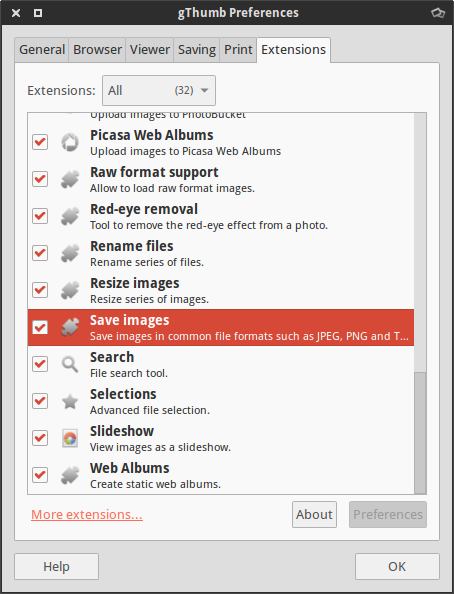
Symptom After editing a image, gThumb can't save the modifications and displays this error message (it could happen to jpeg as well): Could not save the file Could not find a suitable module to save the image as "image/png" Solution Open gThumb preferences ( Edit > Preferences ). On the Extensions tab enable the "Save images" extension.

[HOW TO] Install lastest Krita in Xubuntu from PPA

Image
In its essence Krita is a software for drawing (you can see some examples at the top of this site's right sidebar). Krita development is on constant motion and the official Ubuntu packaging can keep up. If you would like to try the latest Krita enhancements without the hassle of compiling it yourself from source, see below how to. Install from Krita Lime PPA Open a terminal window and run: sudo add-apt-repository ppa:dimula73/krita -y && sudo apt-get update && sudo apt-get install krita-testing krita-testing-dbg -y After installing you should restart your computer. Usage Krita can be accessed via Applications Menu > Graphics >Krita or typing the following command: krita . References Krita got a PPA : Krita Lime

[SOLVED] Xubuntu 13.10 Sound Indicator Problem

Image
Symptom: The Sound Indicator doesn't work in Xubuntu 13.10. In this article we'll learn how to fix this. Install Open a terminal window and run: sudo add-apt-repository ppa:a-j-buxton/indicator-sound-gtk2 -y && sudo apt-get update && sudo apt-get upgrade -y For changes to take effect either restart Xfce session or run the command: killall -HUP xfce4-panel . References The Sound Menu (Gtk2)