Posts

Showing posts with the label Development

Tab-Completion and Syntax coloring for irb (Ruby Interpreter)

Image
Wirble is a Ruby Gem that provides Tab-Completion and syntax coloring for the Ruby interpreter, irb . In this article we'll see how to install it and configure it. irb with Tab-Completion and Syntax coloring Install Open a terminal window and run: sudo gem install wirble && echo -n "require 'rubygems'\nrequire 'wirble'\nWirble.init\nWirble.colorize" >> ~/.irbrc Usage Now that Wirble is installed and irbrc is properly configured, (re)open irb and then you can start using the "TAB" key to auto-complete while typing a Ruby instruction. Only the results will be colorized, not the instructions typed. References Wirble: Tab-Completion and Syntax Coloring for irb | Ruby Inside

[HOW TO] Install gtk-webkit-ruby Gem

WebKit is an open source web browser engine. gtk-webkit-ruby is a Ruby Gem that provides Gtk Webkit bindings for ruby, making it possible to embed a webview (class that has the ability to render a webpage) in a Ruby-GNOME2 application. In this article we'll see how to install it in any Ubuntu distribution. Install Open a terminal window and run: sudo apt-get install ruby-gnome2-dev -y && sudo apt-get install libwebkitgtk-dev -y && sudo gem install gtk-webkit-ruby -y Usage Bellow are the main instructions that should be added to a program in order to render a webpage within a Ruby-GNOME2 application. Please note that this is not a runnable example. require "gtk2" require "webkit" webview = WebKit::WebView.new webview.show webview.open(url) # url is a string Note While I was trying to install the Gem I encountered some errors that were caused by dependencies not being installed in my system: ruby-gnome2-dev and libwebkitgtk...

[HOW TO] Install Oracle JDK 7 Manually in Ubuntu

Image
The Java Development Kit (JDK) is mainly a set of tools for running, compiling and debugging Java applications. There are a few other JDK, but in this article we'll see how to manually install the Oracle's JDK in any distribution from the Ubuntu family. The process consists of downloading the binary package, extract it and update the system so that the new version is used. By the way, if you installed the JDK via PPA, as described in my previous article , both can work alongside. The command update-alternatives can be used to choose one between them. Download The first step is to download the latest binaries package from Oracle's website . On the downloads webpage choose the JDK download button. On the next page you'll see list of several files, but you should focus your attention on two: The file name ends with i586.tar.gz or x86_64.tar.gz . If your system is 32 bits you should select the first one and select the latter if it's 64 bit...

[HOW TO] Install Shoes (Ruby GUI Toolkit) in Xubuntu

Image
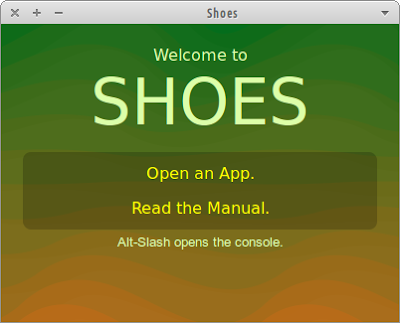
Shoes is a cross-platform toolkit for writing graphical apps easily and artfully using Ruby. Unlike most other GUI toolkits, Shoes is designed to be easy and straightforward without losing power. Figure 1. Shoes (Ruby GUI Toolkit) running on Xubuntu 12.04 Installing Shoes on Xubuntu (or any other Ubuntu distribution) is not as straight forward as it should be. There's a Shoes package in the Ubuntu repositories, however, it's buggy and using it will result in the following error: no such file to load -- rubygems From my experience building Shoes might result in errors during the process. The easiest and simplest way to install Shoes in Xubuntu were to download Shoes 2 (0.r1134), codenamed “Raisins” and use it to run the Shoes programs. It's a older version, but I'm just getting started with Shoes and for now it'll suffice. Install Open a terminal window and run: sudo wget -O /usr/local/bin/shoes http://goo.gl/3cigS && ...

[HOW TO] Install Ruby in Xubuntu

Ruby is an interpreted, dynamic, open source scripting language for easy object-oriented programming. It a focus on simplicity and productivity. It has an elegant syntax that is natural to read and easy to write. In this article will learn how to install the Ruby interpreter and RubyGems in Xubuntu. Then we'll take a quick look at how to run a Ruby program and how to install a gem package. Install Open a terminal window and run: sudo apt-get install ruby rubygems -y Run a Ruby script ruby script.rb Run the interactive interpreter The irb is a tool to execute interactively ruby expressions read from stdin. Run the command irb and type the Ruby command. Examples: $ irb irb(main):001:0> 2**20 => 1048576 irb(main):002:0> name = gets XubuntuGeek => "XubuntuGeek\n" irb(main):003:0> name.chop! => "XubuntuGeek" irb(main):004:0> puts "Hello #{name}" + "!" * 3 Hello XubuntuGeek!!! => nil List remote instal...

[FIX] cmake "CMAKE_CXX_COMPILER-NOTFOUND" error

If you come across this error while using cmake to build from source: CMake Error: your CXX compiler: "CMAKE_CXX_COMPILER-NOTFOUND" was not found. Please set CMAKE_CXX_COMPILER to a valid compiler path or name. It means that you don't have the build tools installed (the g++ in this case). Fix Open a terminal window and run: sudo apt-get install build-essential -y References How to fix cmake "CMAKE_CXX_COMPILER-NOTFOUND" error