Add application to Xfce/Xubuntu session startup [Xubuntu >= 11.10]
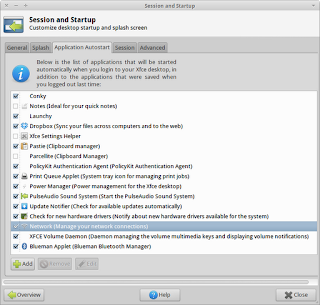
When a user logs in, the desktop environment starts do load the necessary resources to provide its functionality. Some of this process is configurable by the user. For instance, the user can choose which applications will be run when the session is loaded. fig.1 List of applications that will be started when the user logs in Add Application to startup Open ' Settings Manager ' Select 'Session and Startup' On the 'Application Autostart' click on the 'Add' button On the dialog that opens (fig.2) write the name of the application and the command that runs the application (description isn't mandatory). Once you click 'OK' the application will be added to the list and will automatically be started on the next session login. fig.2 Dialog for entering the information of the startup application Related posts: Edit Xfce Settings with graphical interface